
















XR Daily News
Contact Us
  • Home
  • Virtual Reality
    • All
    • Apple VR
    • Meta VR
    • Newest Hardware VR
    • Other Companies VR
    • Pico VR
    • Pimax VR
    Immersed Visor

    Immersed Visor: New 4K Micro-OLED VR/AR Glasses Available for Preorder at $500 and $750

    Kiwi Design Clip-On Headphones Review Thumbnail

    Kiwi Design Clip-On Headphones for Quest 2: In-Depth Review

    Pimax Crystal Eye Tracking Standalone Mode

    Pimax Crystal Gets Eye-Tracking & Standalone Mode Update

    Valve Index

    Valve’s Mystery Device Secures South Korean Certification – Could it be VR Headset?

    Nintendo VR Device

    Nintendo is Supposedly Working on a VR/AR Headset with Google

    Meta Quest Sub-$200 and Quest 4 Pro

    NEW: Meta Reportedly to Release Sub-$200 VR Headset in 2024 and ‘Quest 4 Pro’ in 2025

    Trending Tags

    • Virtual Reality
    • PCVR
    • VR Games
    • Apple
    • Meta
    • Pico
    • Pimax
  • Augmented Reality
    • All
    • Apple AR
    • Meta AR
    • Newest Hardware AR
    • Other Companies AR
    Immersed Visor

    Immersed Visor: New 4K Micro-OLED VR/AR Glasses Available for Preorder at $500 and $750

    Ray-Ban Stories 2

    Meta May Announce Ray-Ban Stories 2 at Meta Connect Next Week

    Lenovo AR Smartglasses

    Lenovo Rumored to Launch AR Smartglasses Alongside Steam Deck Rival Next Month

    Meta's Ray-Ban Stories AR Glasses

    Meta to Produce Only 1,000 Cutting-edge AR Glasses in 2024

    Samsung VR AR Headset Prototype

    Leaked Samsung’s Competitor for Vision Pro Discovered, Prototype Cancelled

    Apple Vision Pro Laying on the Table

    Low Engagement Reported in Apple Vision Pro Developer Labs

    Trending Tags

    • Augmented Reality
    • Mixed Reality
    • Apple
    • Meta
    • AR Games
  • Software
    LMNL Engine Thumbnail

    LMNL Engine – New VR-Focused Lightweight Game Engine

    Meta Quest v57 Update

    Meta Quest v57 Update Arrives: Notable Improvements, But Still No Legs

    Meta Quest Legs Avatars

    Meta Quest Update – VR Avatars now Have Legs, Extended Battery Life Mode Datamined

    Samsung VR AR Headset Prototype

    Leaked Samsung’s Competitor for Vision Pro Discovered, Prototype Cancelled

    Meta Quest 2 Hand Tracking 2.2

    Hand Tracking Gets Huge 75% Improvement on Meta Quest 2

    Multi-Touch Meta Quest Messenger

    Multi-Touch & Messenger App Coming to Meta Quest in v55 Update

    Trending Tags

    • Virtual Reality
    • Augmented Reality
    • VR Games
    • AR Games
    • Mixed Reality
  • Games
    Bulletstorm VR 2

    Action-Packed Bulletstorm VR to Launch on Meta Quest 2 and PSVR2 December 14th

    Far Cry VR

    Far Cry VR is Now Available – Free Mod With Motion Controls

    VRSO: Bare Knuckle Fighting Gore

    VRSO Bare Knuckle Fighting – New Promising VR Boxing Game announced on Quest 2

    Tea For God VR Game

    Tea For God: VR’s Most Innovative Game Now Available on Quest and Steam

    Roblox on Meta Quest 2,Pro, and Quest 3

    Roblox Officially Coming to VR: Launch On Meta Quest 2 Soon

    Meta Quest Plus Subscription

    Meta Quest Plus is Official: Claim 2 Games Monthly For $7.99

    Trending Tags

    • Virtual Reality
    • VR Games
    • Review
    • Mixed Reality
    • Meta
    • Apple
    • AR Games
  • Reviews
    Kiwi Design Clip-On Headphones Review Thumbnail

    Kiwi Design Clip-On Headphones for Quest 2: In-Depth Review

    Kiwi Design Upgraded Fitness Facial Interface for Quest 2 Review

    Review: Kiwi Design Upgraded Fitness Facial Interface for Quest 2

    Kiwi Design Battery Headstrap Review

    In-Depth Review: Kiwi Design Battery Headstrap for Quest 2

    Pico 4 AMVR 3–In-1 Headstrap Review

    Pico 4 Accessory: AMVR 3–In-1 Headstrap Review

    Pico 4 Review VR

    Pico 4 Review Almost a Year Later: is it Still Worth it?

    Hubris on Meta Quest 2 Review Recenzja

    Hubris on Meta Quest 2 Review: A Big Missed Opportunity

    Trending Tags

    • Review
    • AR Games
    • VR Games
    • Virtual Reality
    • Mixed Reality
    • Pimax
    • Pico
  • Rumors
No Result
View All Result
XR VR Daily News Logo
  • Home
  • Virtual Reality
    • All
    • Apple VR
    • Meta VR
    • Newest Hardware VR
    • Other Companies VR
    • Pico VR
    • Pimax VR
    Immersed Visor

    Immersed Visor: New 4K Micro-OLED VR/AR Glasses Available for Preorder at $500 and $750

    Kiwi Design Clip-On Headphones Review Thumbnail

    Kiwi Design Clip-On Headphones for Quest 2: In-Depth Review

    Pimax Crystal Eye Tracking Standalone Mode

    Pimax Crystal Gets Eye-Tracking & Standalone Mode Update

    Valve Index

    Valve’s Mystery Device Secures South Korean Certification – Could it be VR Headset?

    Nintendo VR Device

    Nintendo is Supposedly Working on a VR/AR Headset with Google

    Meta Quest Sub-$200 and Quest 4 Pro

    NEW: Meta Reportedly to Release Sub-$200 VR Headset in 2024 and ‘Quest 4 Pro’ in 2025

    Trending Tags

    • Virtual Reality
    • PCVR
    • VR Games
    • Apple
    • Meta
    • Pico
    • Pimax
  • Augmented Reality
    • All
    • Apple AR
    • Meta AR
    • Newest Hardware AR
    • Other Companies AR
    Immersed Visor

    Immersed Visor: New 4K Micro-OLED VR/AR Glasses Available for Preorder at $500 and $750

    Ray-Ban Stories 2

    Meta May Announce Ray-Ban Stories 2 at Meta Connect Next Week

    Lenovo AR Smartglasses

    Lenovo Rumored to Launch AR Smartglasses Alongside Steam Deck Rival Next Month

    Meta's Ray-Ban Stories AR Glasses

    Meta to Produce Only 1,000 Cutting-edge AR Glasses in 2024

    Samsung VR AR Headset Prototype

    Leaked Samsung’s Competitor for Vision Pro Discovered, Prototype Cancelled

    Apple Vision Pro Laying on the Table

    Low Engagement Reported in Apple Vision Pro Developer Labs

    Trending Tags

    • Augmented Reality
    • Mixed Reality
    • Apple
    • Meta
    • AR Games
  • Software
    LMNL Engine Thumbnail

    LMNL Engine – New VR-Focused Lightweight Game Engine

    Meta Quest v57 Update

    Meta Quest v57 Update Arrives: Notable Improvements, But Still No Legs

    Meta Quest Legs Avatars

    Meta Quest Update – VR Avatars now Have Legs, Extended Battery Life Mode Datamined

    Samsung VR AR Headset Prototype

    Leaked Samsung’s Competitor for Vision Pro Discovered, Prototype Cancelled

    Meta Quest 2 Hand Tracking 2.2

    Hand Tracking Gets Huge 75% Improvement on Meta Quest 2

    Multi-Touch Meta Quest Messenger

    Multi-Touch & Messenger App Coming to Meta Quest in v55 Update

    Trending Tags

    • Virtual Reality
    • Augmented Reality
    • VR Games
    • AR Games
    • Mixed Reality
  • Games
    Bulletstorm VR 2

    Action-Packed Bulletstorm VR to Launch on Meta Quest 2 and PSVR2 December 14th

    Far Cry VR

    Far Cry VR is Now Available – Free Mod With Motion Controls

    VRSO: Bare Knuckle Fighting Gore

    VRSO Bare Knuckle Fighting – New Promising VR Boxing Game announced on Quest 2

    Tea For God VR Game

    Tea For God: VR’s Most Innovative Game Now Available on Quest and Steam

    Roblox on Meta Quest 2,Pro, and Quest 3

    Roblox Officially Coming to VR: Launch On Meta Quest 2 Soon

    Meta Quest Plus Subscription

    Meta Quest Plus is Official: Claim 2 Games Monthly For $7.99

    Trending Tags

    • Virtual Reality
    • VR Games
    • Review
    • Mixed Reality
    • Meta
    • Apple
    • AR Games
  • Reviews
    Kiwi Design Clip-On Headphones Review Thumbnail

    Kiwi Design Clip-On Headphones for Quest 2: In-Depth Review

    Kiwi Design Upgraded Fitness Facial Interface for Quest 2 Review

    Review: Kiwi Design Upgraded Fitness Facial Interface for Quest 2

    Kiwi Design Battery Headstrap Review

    In-Depth Review: Kiwi Design Battery Headstrap for Quest 2

    Pico 4 AMVR 3–In-1 Headstrap Review

    Pico 4 Accessory: AMVR 3–In-1 Headstrap Review

    Pico 4 Review VR

    Pico 4 Review Almost a Year Later: is it Still Worth it?

    Hubris on Meta Quest 2 Review Recenzja

    Hubris on Meta Quest 2 Review: A Big Missed Opportunity

    Trending Tags

    • Review
    • AR Games
    • VR Games
    • Virtual Reality
    • Mixed Reality
    • Pimax
    • Pico
  • Rumors
No Result
View All Result
XR Daily News Logo | VR & AR News Logo
No Result
View All Result
Home Reviews

Review: Kiwi Design Upgraded Fitness Facial Interface for Quest 2

Cezary Sobociński by Cezary Sobociński
08/09/2023
in Reviews
0
Kiwi Design Upgraded Fitness Facial Interface for Quest 2 Review

Kiwi Design Upgraded Fitness Facial Interface DEALS

  • Kiwi Design
    $45.99 VIEW
  • Amazon
    $45.99 VIEW

Fogging lenses, light leakage, and an uncomfortable face cushion got you down? Kiwi Design might have the solutions you need. Again.

In my previous review, I evaluated the Kiwi Design Battery Headstrap, which significantly improves comfort while wearing a headset. However, to achieve maximum comfort with your Quest 2, you also need to ensure the face cushion, the material that comes into contact with your face, is comfortable.

While the default facial interface that comes with the Quest 2 serves its purpose, it has its flaws. It absorbs sweat, is challenging to clean, and allows for significant light leakage through the nose gap, among other issues. All of these factors can disrupt your immersion and make it difficult to share the headset or use it altogether. To address these and other problems, you have the option to upgrade your facial interface, just as you can upgrade your headstrap.

In this review, we will examine the Kiwi Design Fitness Facial Interface, a product that can arguably be just as crucial as your headstrap.

Disclosure: Kiwi Design provided me with the Fitness Facial Interface, but had no input on this review. All opinions are my own.


Table of Contents

  • Unboxing and Installation
  • Zero Light Leakage!
  • Fitness vs Leather Cushion
  • Comfort
  • Testing in Fitness Games
  • Washing
  • Conclusion – Worth $45.99?

Unboxing and Installation

Let’s begin with unboxing – the first thing you’ll do once the courier arrives at your door. Right from the start, the product greets us with an elegant wood-colored Kiwi Design box. It arrived to me slightly damaged, but it had no effect on the products inside.
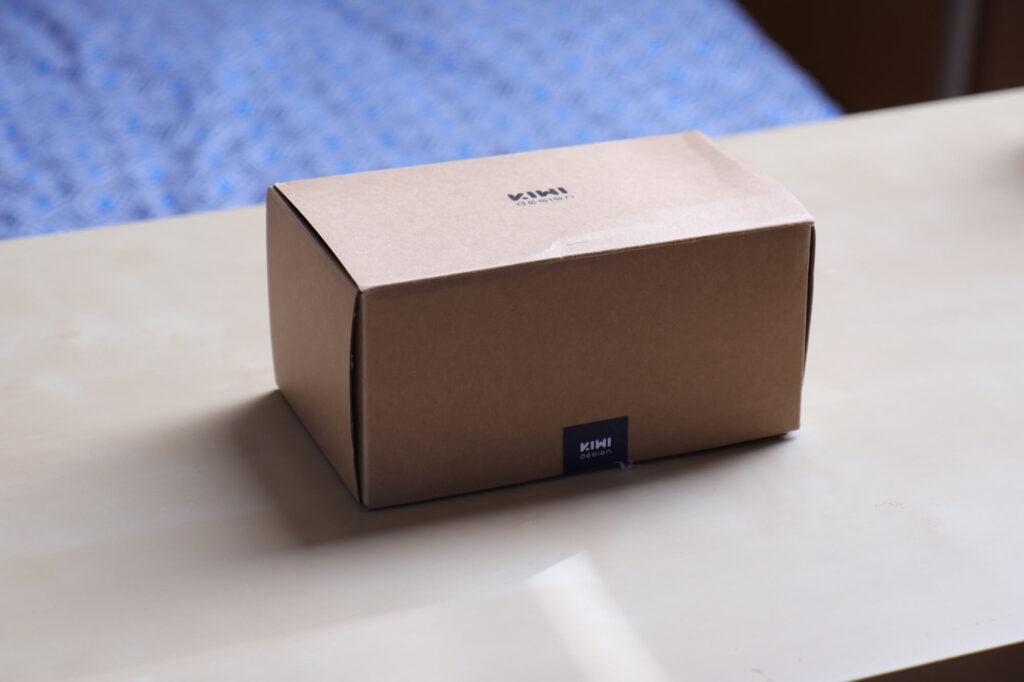
Kiwi Design Upgraded Fitness Facial Interface for Quest 2 Package
Nice package, but a little bit damaged by the courier.

However, as they say, don’t judge a book by its cover, and this saying applies to this product. While the packaging is nice and elegant, upon opening it, the first thing we see is the foil containing all the face cushions and other essential items neatly packed inside.

I preferred the packaging of the Battery Headstrap, but let’s be honest – who really cares about unboxing quality? The important thing is what we find inside the package, and this is where the Fitness Facial Interface shines.
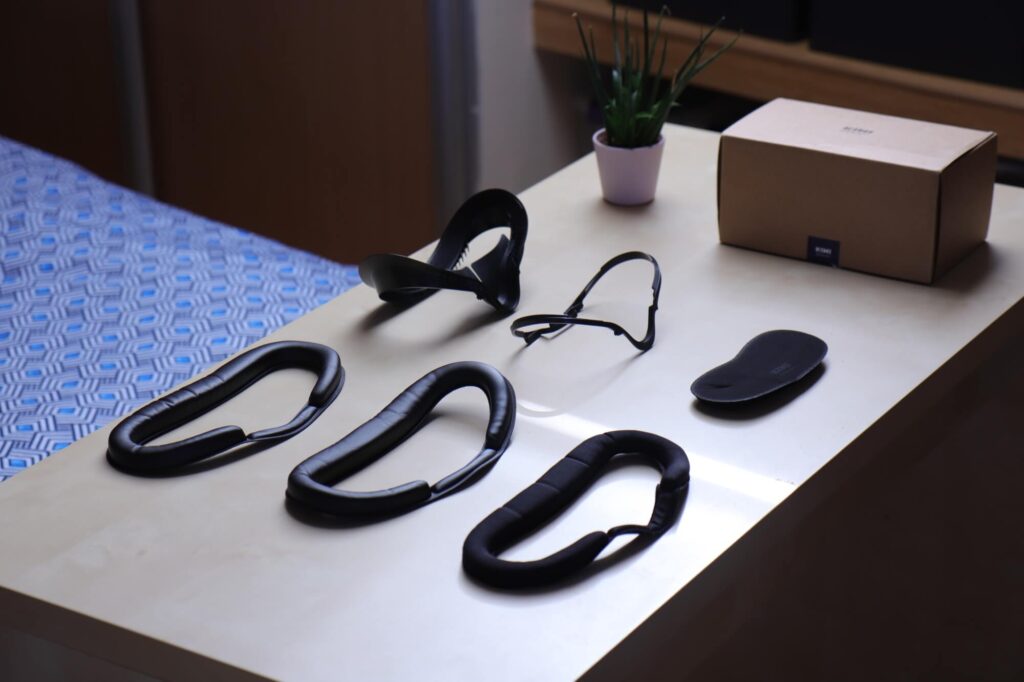
Kiwi Design Upgraded Fitness Facial Interface for Quest 2 Unboxing
All we get inside the box! Well, apart from the flower…

So, after unboxing, we have six items in total. Yes, you heard it right, six items! Let’s begin with the Facial Interface – this rigid component is where we’ll attach our facial cushions, of which we receive three.

One is the Fitness cushion, and the other two are leather-based cushions. We also receive a glass spacer (essentially almost the same as what comes with the Quest 2, but Kiwi Design includes its own due to the different Facial Interface). Additionally, there’s a crucial product that many people tend to overlook – the lens protector.
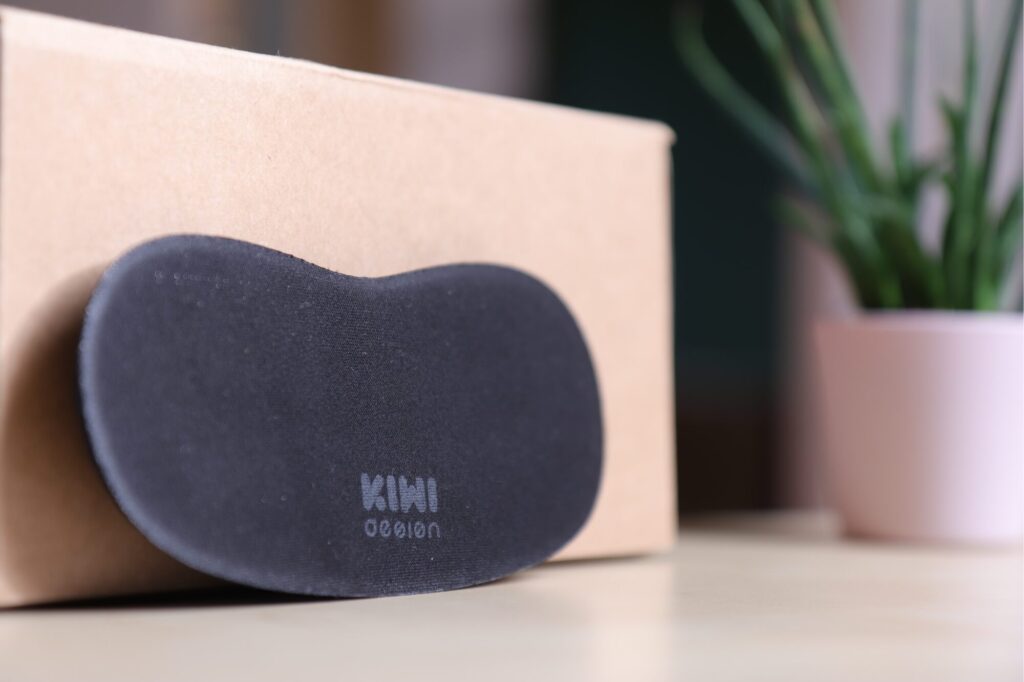
Kiwi Design Lens Protector

This package is a fantastic combination of highly useful products, each serving different purposes. It significantly improves your comfort, and you no longer need to worry about damaging your headset’s display with direct sunlight, thanks to the lens protector. With all these components inside the package, you might be wondering how to install them on your headset.

The installation of the facial interface is relatively straightforward but may seem a bit confusing at first. To attach the facial cushion to the facial interface, you need to bend it, place it in the center of the facial interface, and then carefully unfold it. If it doesn’t fit perfectly the first time, don’t worry; simply give it another try. You’ll likely get the hang of it quickly, and the facial cushion should install smoothly.
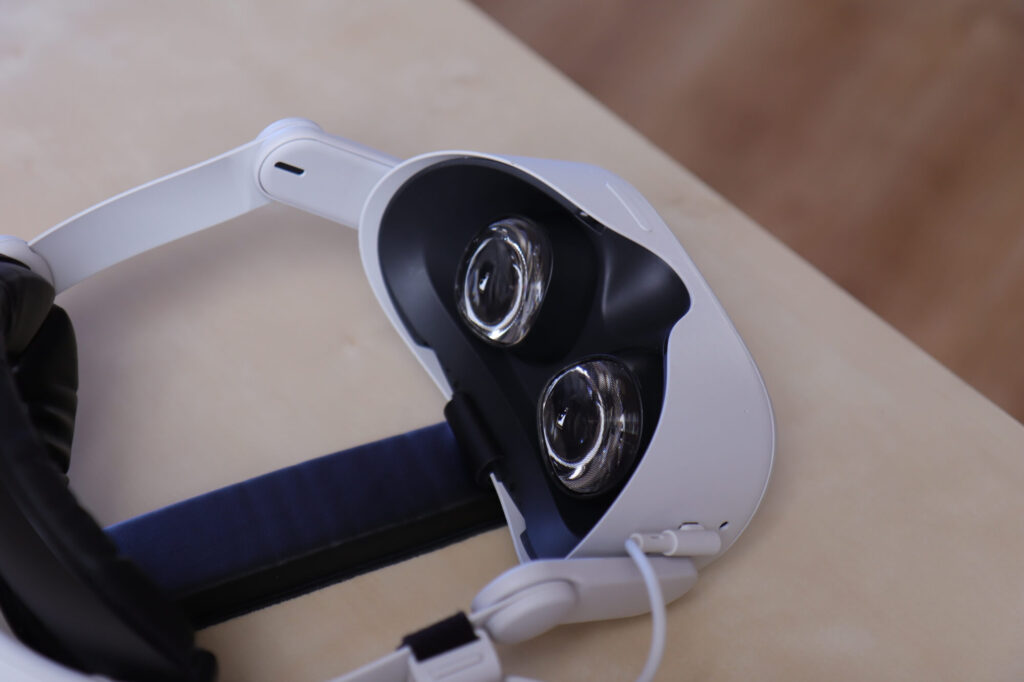
Quest 2 before installing facial interface
Quest 2 before installing the facial interface

Then, you can simply slide the facial interface into the headset. That’s it; you’re ready to play. Once you put on the headset with the facial interface installed, you’ll notice that you are completely cut off from the real world. This naturally leads us to the next point in the review.
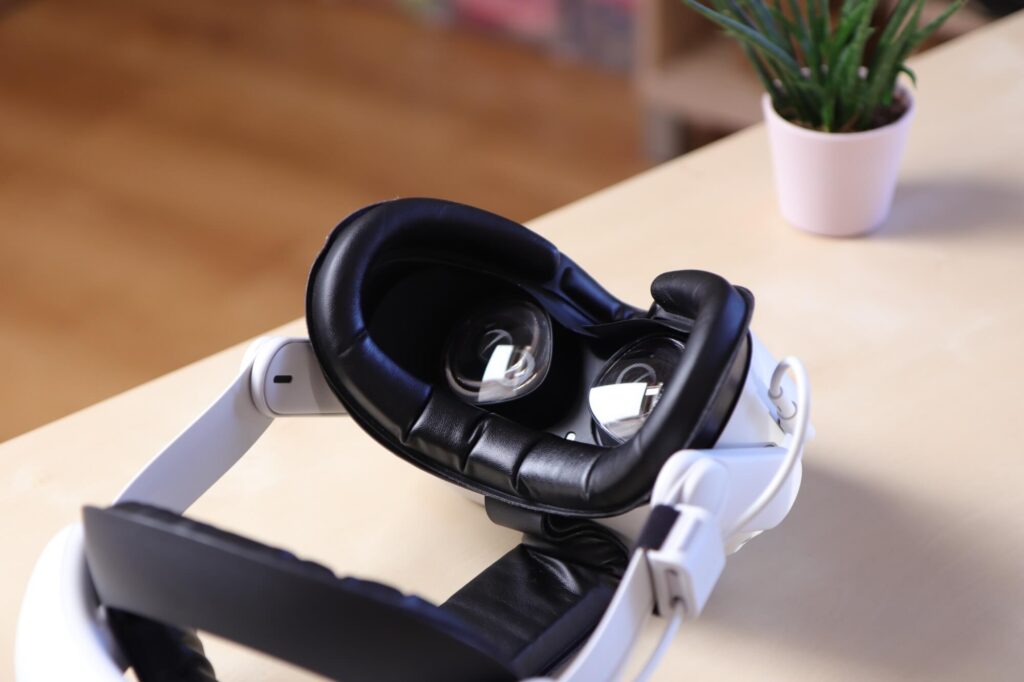
Quest 2 after installing facial interface
Quest 2 after installing the facial interface

Zero Light Leakage!

Once you put on the headset, you’ll immediately notice that there is absolutely no light leakage. Light leakage tended to distract me from the immersion when using the stock Quest 2 facial interface. This issue is completely resolved there, mainly due to the rubber material on the facial interface that comes into contact with your nose – it effectively blocks out all light.

There were some situations when the light-blocking material would curl around my cheekbones, just below my eyes, causing some discomfort. However, a minor adjustment easily fixed this, so it wasn’t a significant issue.

I still love the concept of an open peripheral with your headset, allowing a lot of light into your headset. So, why do I believe that light leakage is such a disruption from immersion when I like the idea of a fully open headset from the sides? Well, the thing is, fully open peripherals keep you aware of your surroundings, which arguably makes it easier to get used to them. They also have different use cases – They are ideal when you are using the headset for Mixed Reality.

However, even a slight light leakage from your nose gap can be irritating when you have all your other sides covered, ultimately disrupting immersion in the game. That’s why eliminating this problem is a significant advantage of the Kiwi Design Fitness Facial Interface, but there are more benefits to discuss.
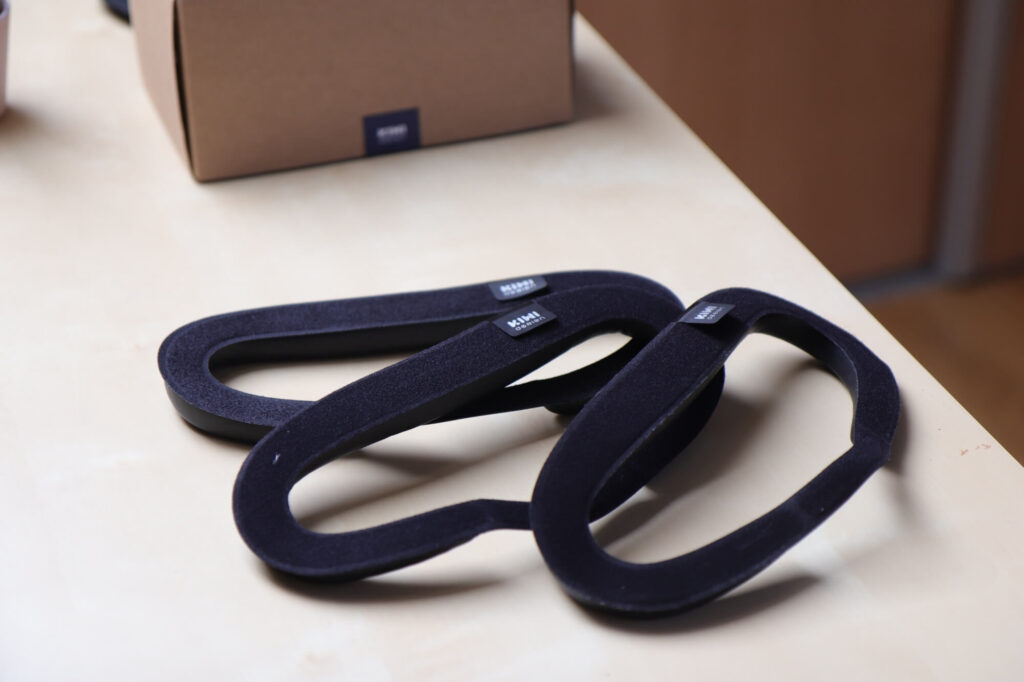
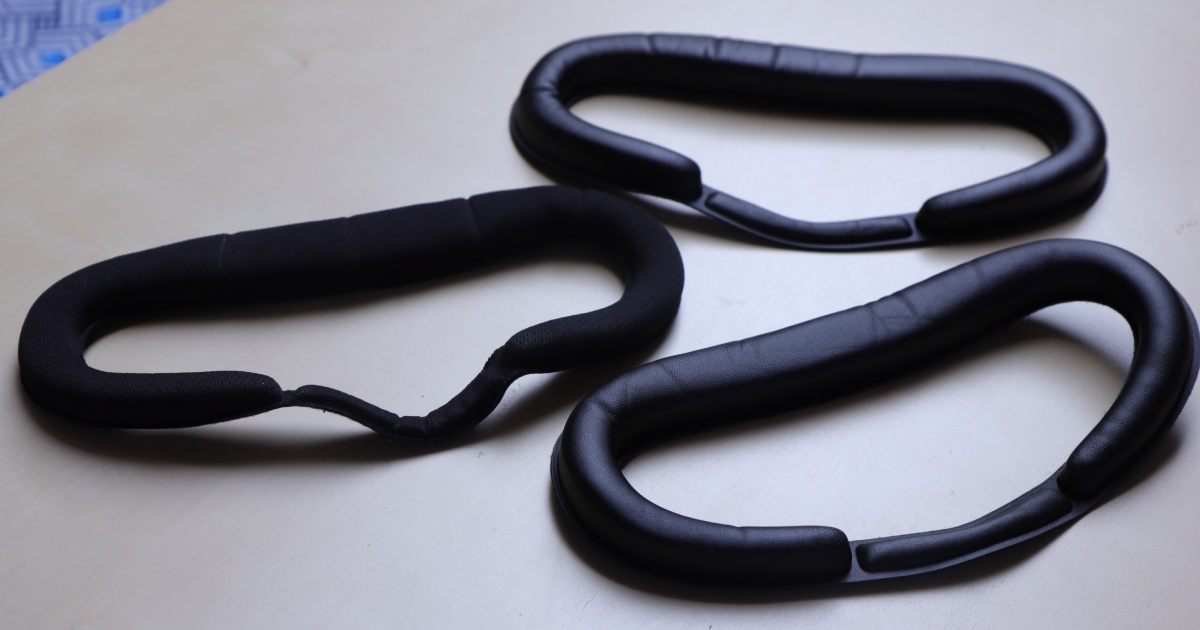
Three different face cushions
Three different face cushions!

Fitness vs Leather Cushion

So, what’s the deal with having three face cushions included in the package? As I mentioned earlier, you get one fitness cushion and two made from leather. Leather is a non-absorbent material, which means that if you sweat a lot during gameplay or it gets dirty or wet, it won’t absorb anything, making it easy to clean – just wipe everything off the surface.

On the other hand, the fitness cushion is made from an absorbent material, which means that it will soak up your sweat during extended gameplay sessions. Consequently, sharing the headset might be problematic. For instance, imagine hosting a party where everyone wants to take turns playing Beat Saber. As you can guess, some of the players may work up a sweat after their turn, making it unhygienic to share the headset.
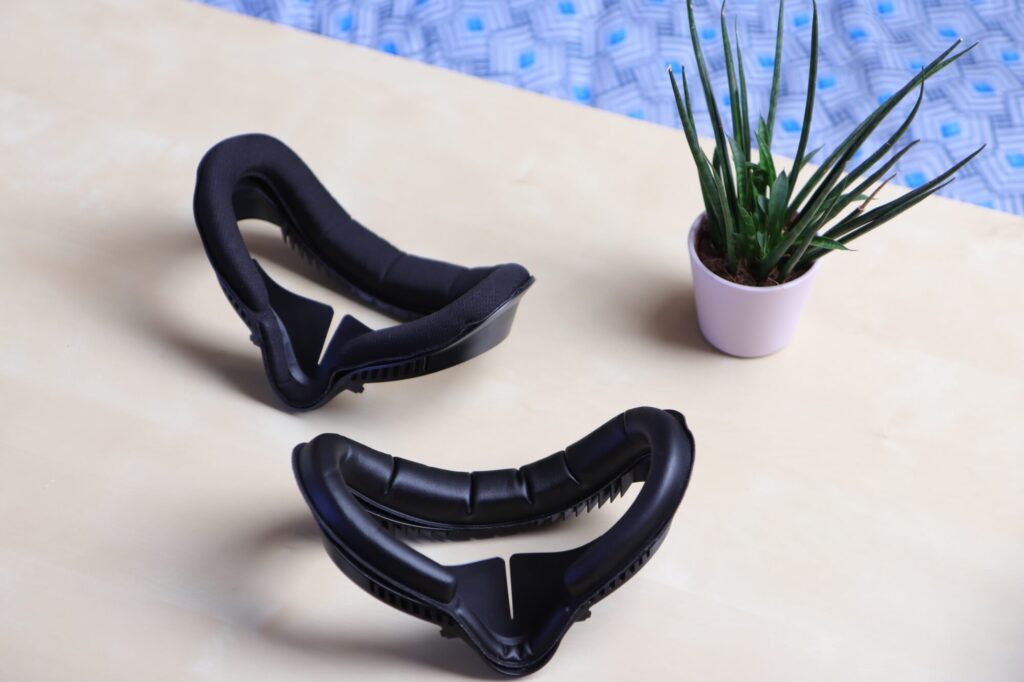
Fitness vs Leather Cushion

To prevent this issue, Kiwi Design has included Leather Face Cushions (even two of them). This solution effectively resolves the problem, as you can simply wipe off the sweat from the leather surface, making the headset ready to be shared with others. At this point, you might wonder why we even need the Fitness facial interface if leather cushions are better – they don’t absorb sweat. Well, there’s more to it.

The ‘Fitness’ Facial Interface, as the name suggests, is specifically designed for… fitness – and it is great in this role. It is crafted from a highly breathable material and offers superior air filtration compared to the leather cushion, resulting in no lens fogging. Additionally, its sweat-absorbing capability ensures that there is minimal to no sweat on your lenses while playing fitness games, unlike the Leather face cushion, where sweat can drip onto the lenses.
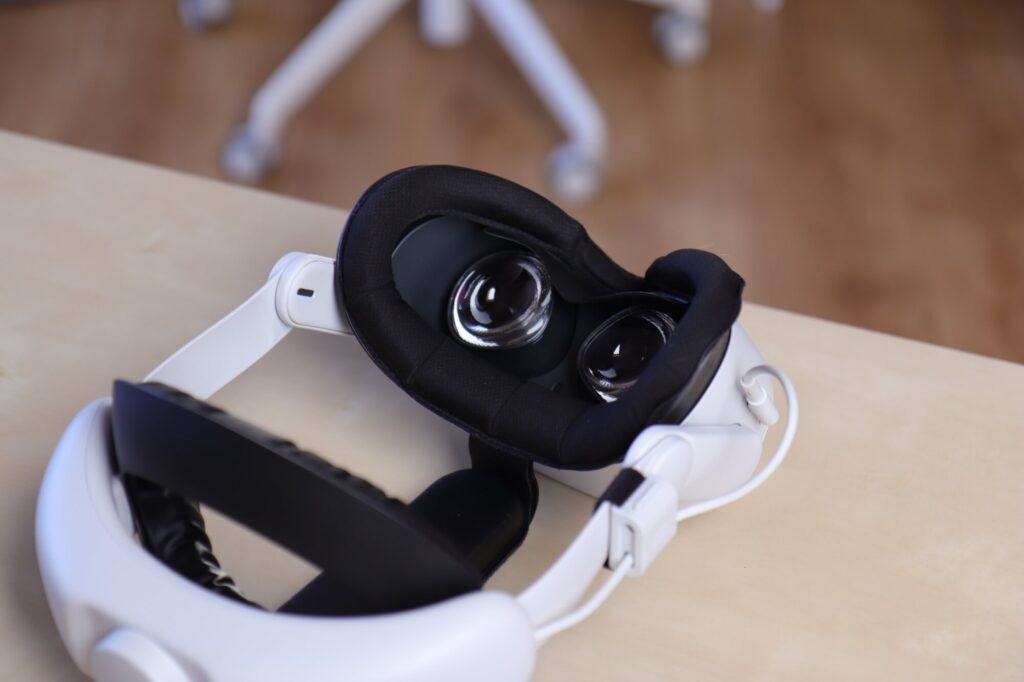

Comfort

From this point, I will continue to compare the two, focusing on comfort. I must say that, for me personally, the Fitness Facial Interface is noticeably more comfortable. But don’t misunderstand me – both are highly comfortable options. However, the fitness variant simply fits better to my face.

This slight difference in comfort becomes more noticeable during longer play sessions. This means that when sharing the headset after a short period of playing, opting for the Leather Facial Interface is a better choice than the Fitness variant.
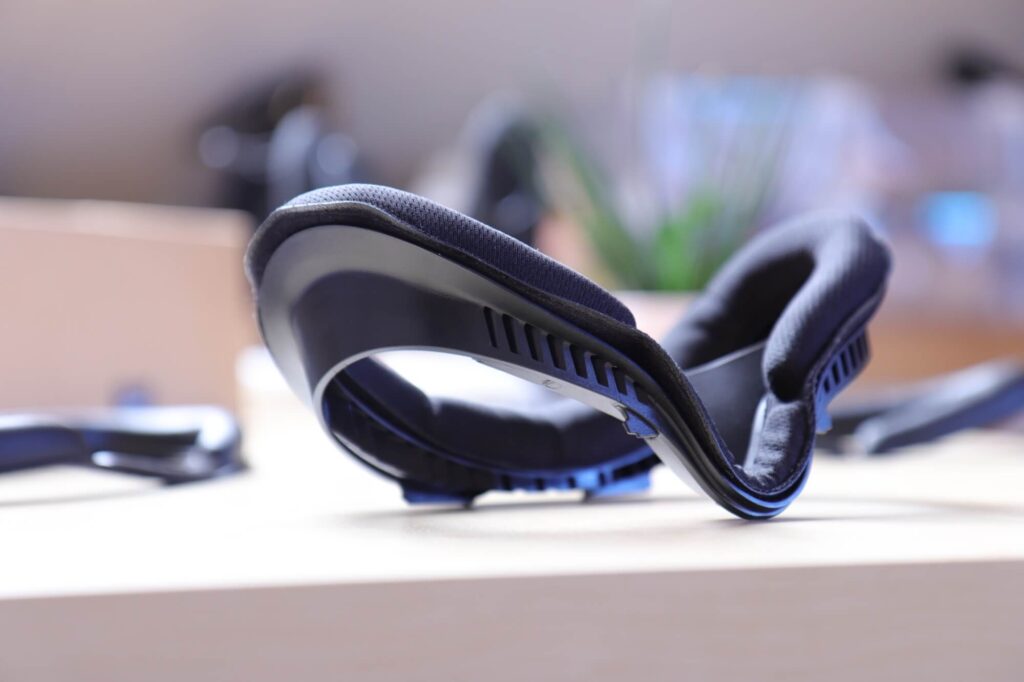
Kiwi Design Upgraded Fitness Facial Interface for Quest 2
Fitness Facial Interface

I also noticed that after extended play sessions, the ‘VR Face’ (red marks around your face, matching the shape of the facial interface) is far less noticeable when using the Fitness Facial Interface compared to the Leather one. This is particularly important because many people might prefer to play VR during the day, perhaps before leaving the house. Thus, looking good after your VR sessions can be important for some users. This is the reason why picking the Fitness Facial Interface is better when playing alone and not sharing your headset with others.
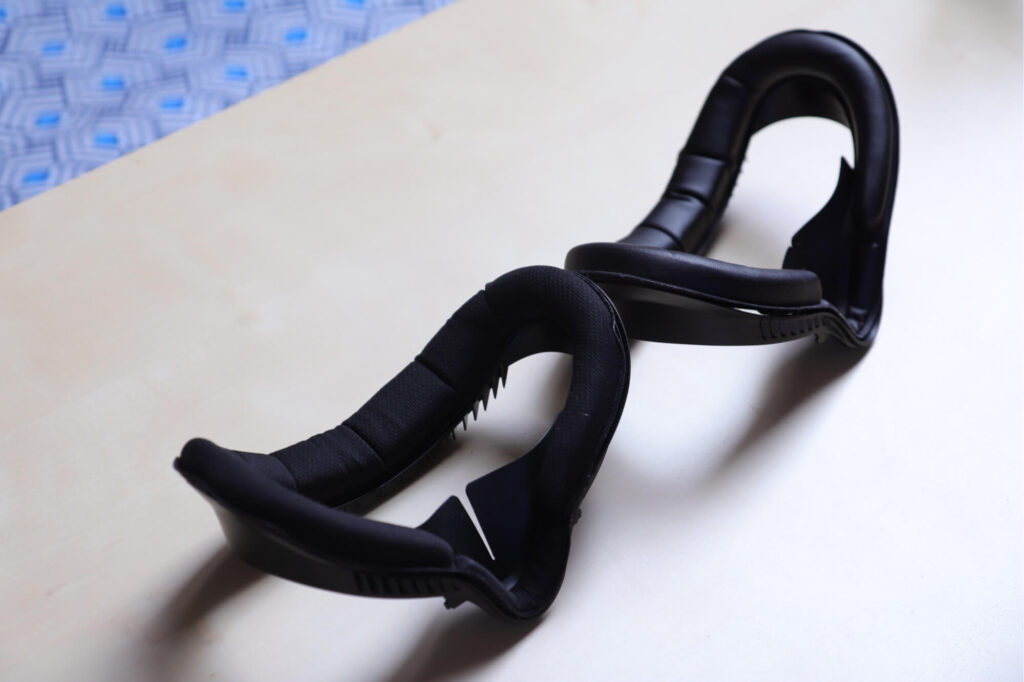
Fitness vs Leather Cushion

Testing in Fitness Games

The Fitness Facial Interface is primarily designed for fitness games, so I tested it mostly with fast-paced fitness games where you can sweat a lot, using both facial interfaces. My tests included games like Thrill of the Fight, Pistol Whip, Half-Life Alyx (wave shooter mods), and many others.

Through my testing, I observed that my face didn’t really feel the presence of the fitness facial interface, while the leather one felt increasingly noticeable and uncomfortable as time went on (still far more comfortable than the one shipped with Quest 2 though).

I also experienced issues with fogging lenses and sweat on them while using the leather facial interface. I had to repeatedly wipe them off every few minutes during gameplay, which was quite frustrating (who wants to take the headset off every few minutes?) However, I didn’t experience these problems with the fitness facial interface.
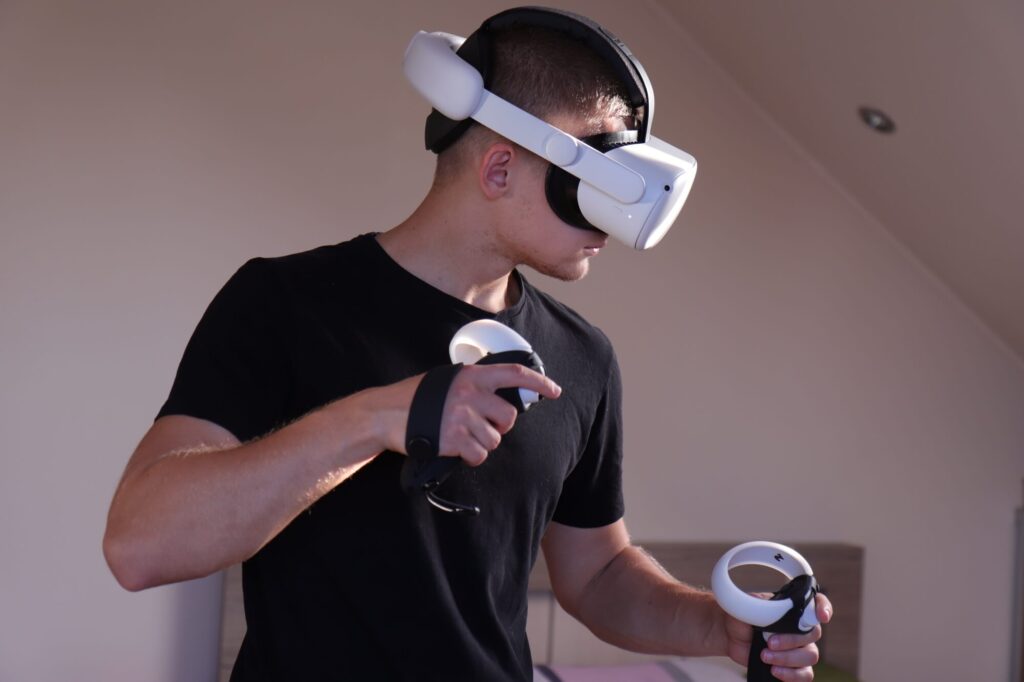
Testing in Fitness Games
Fighting Demons…

Washing

Now, you might be wondering how to clean the fitness facial interface after it has absorbed all that sweat. This was a major issue with the face cushion that came with the Quest 2 because it was permanently attached to the facial interface, making it difficult to wash. However, this problem is now resolved because you can easily detach the face cushion from the facial interface; they are held together with Velcro.

To clean the fitness facial interface, simply wash it under the sink with soap; this is what I usually do. If you’ve had an intense VR workout and your fitness facial interface needs a more thorough cleaning, you can also throw it in the washing machine. After washing, it should come out looking and smelling fresh.

After washing, simply place it on a table or somewhere else and wait until it is dry. Drying times can vary depending on various factors, but it usually takes a few hours. Once it’s dry, you’re ready to enjoy VR again.


Conclusion – Worth $45.99?

After considering all the pros and cons of the product, I genuinely believe Kiwi Design Fitness Facial Interface offers excellent value for its price. Inside the box, you receive three different face cushions, with two of them serving a unique purpose, a light-blocking facial interface, a glasses spacer, and a lens protector.

All of these enhancements significantly improve the VR experience, making it more comfortable, suitable for fitness sessions, easier to share with others, and much simpler to clean and maintain. It represents a substantial upgrade over the stock facial interface that comes with the Quest 2.

The Review

Kiwi Design Upgraded Fitness Facial Interface

8.6 Score

After weighing the pros and cons, I believe this product offers great value for its price. Inside the box, you get three face cushions, a light-blocking facial interface, a glasses spacer, and a lens protector. These improvements enhance comfort, make it suitable for fitness sessions, simplify sharing, and ease cleaning. It's a significant upgrade from the stock Quest 2 facial interface.

PROS

  • Greatly Improved Comfort
  • No Light Leakage
  • No Lens Fogging
  • Varied Products inside the Box
  • Three Face Cushions Included
  • Very Easy to Install
  • Easy to Clean
  • Sharing the Headset Becomes Easy

CONS

  • Comfort of Face Cushions Can Differ
Review Breakdown

  • Comfort of Fitness Facial Interface 0
  • Comfort of Leather Facial Interface 0
  • Ease of Use 0
  • Ease of Cleaning 0
  • Value-to-Price 0

Kiwi Design Upgraded Fitness Facial Interface DEALS

We collect information from many stores for best price available

Best Price

$45
  • Kiwi Design
    $45.99 Buy Now
  • Amazon
    $45.99 Buy Now
Tags: Review
ShareTweet
Previous Post

Valve’s Mystery Device Secures South Korean Certification – Could it be VR Headset?

Next Post

Pimax Crystal Gets Eye-Tracking & Standalone Mode Update

Related Posts

Kiwi Design Clip-On Headphones Review Thumbnail
Reviews

Kiwi Design Clip-On Headphones for Quest 2: In-Depth Review

16/09/2023
Kiwi Design Battery Headstrap Review
Reviews

In-Depth Review: Kiwi Design Battery Headstrap for Quest 2

03/09/2023
Pico 4 AMVR 3–In-1 Headstrap Review
Reviews

Pico 4 Accessory: AMVR 3–In-1 Headstrap Review

by Mat Pawluczuk
17/08/2023
Pico 4 Review VR
Reviews

Pico 4 Review Almost a Year Later: is it Still Worth it?

by Mat Pawluczuk
15/07/2023
Hubris on Meta Quest 2 Review Recenzja
Reviews

Hubris on Meta Quest 2 Review: A Big Missed Opportunity

25/06/2023
Next Post
Pimax Crystal Eye Tracking Standalone Mode

Pimax Crystal Gets Eye-Tracking & Standalone Mode Update

Meta Quest v57 Update

Meta Quest v57 Update Arrives: Notable Improvements, But Still No Legs

Leave a Reply Cancel reply

Your email address will not be published. Required fields are marked *

I agree to the Terms & Conditions and Privacy Policy.

Rekomendowane

Apple Mixed Reality Headset with outbound battery and OLED display in the front

Top 100 Executives Get First Look at Apple Mixed Reality Headset Ahead of June Launch

27/03/2023
Bifrost Pulse VR Haptic Gloves

VR Haptic Gloves with Force Feedback/Finger Tracking at $299

03/05/2023
PSVR2 and PCVR

iVRy Pauses Development on PSVR2 Compatibility with PC Project

07/05/2023

Recommended

Apple Mixed Reality Headset with outbound battery and OLED display in the front

Top 100 Executives Get First Look at Apple Mixed Reality Headset Ahead of June Launch

27/03/2023
Bifrost Pulse VR Haptic Gloves

VR Haptic Gloves with Force Feedback/Finger Tracking at $299

03/05/2023
PSVR2 and PCVR

iVRy Pauses Development on PSVR2 Compatibility with PC Project

07/05/2023

Categories

  • Apple AR
  • Apple VR
  • Augmented Reality
  • Games
  • Meta AR
  • Meta VR
  • Newest Hardware AR
  • Newest Hardware VR
  • Other Companies AR
  • Other Companies VR
  • Pico VR
  • Pimax VR
  • Reviews
  • Software
  • Virtual Reality

Dla ciebie

Valve Index / Valve Deckard

Valve Deckard Będzie Rewolucją – Podsumowanie wycieków

10/05/2023
Apple WWDC xrOS
Software

‘xrOS’ Trademark Registered by Apple, Fueling Speculation About WWDC Headset Announcement

16/05/2023
Meta Quest Sub-$200 and Quest 4 Pro
Virtual Reality

NEW: Meta Reportedly to Release Sub-$200 VR Headset in 2024 and ‘Quest 4 Pro’ in 2025

04/09/2023
Meta Quest 3 release date
Virtual Reality

Meta Quest 3 Release Date Teased as October 10 by Amazon Listing

25/08/2023
Apple's Headset Renders From side gogle VR/AR Apple gogli VR/AR

Gogle VR/AR Apple: Koszt Produkcji Szacowany na $1500

18/05/2023
Meta Quest 3 Unboxing Leak
Virtual Reality

Video Unboxing of Meta Quest 3 Leak Reveals What Is Inside the Box

23/08/2023

For you

No Content Available
xr daily news logo white VR

Keep up with the latest developments and get in-depth insights into the exciting worlds of VR, AR, MR, and beyond, by exploring our information portal.

Categories

  • Apple AR (17)
  • Apple VR (10)
  • Augmented Reality (32)
  • Games (24)
  • Meta AR (7)
  • Meta VR (20)
  • Newest Hardware AR (11)
  • Newest Hardware VR (19)
  • Other Companies AR (8)
  • Other Companies VR (11)
  • Pico VR (3)
  • Pimax VR (2)
  • Reviews (7)
  • Software (19)
  • Virtual Reality (120)
  • Contact Us
  • Home
  • Opt-out preferences
  • Privacy Policy
  • Terms of Use

© 2023 XR Daily News by Cezary Sobociński | All RIGHTS RESERVED.

No Result
View All Result
  • Home
  • Virtual Reality
  • Augmented Reality
  • Software
  • Games
  • Reviews
  • Rumors

© 2023 XR Daily News by Cezary Sobociński | All RIGHTS RESERVED.

Welcome Back!

Login to your account below

Forgotten Password?

Retrieve your password

Please enter your username or email address to reset your password.

Log In

Add New Playlist

Manage Cookie Consent
To provide the best experiences, we use technologies like cookies to store and/or access device information. Consenting to these technologies will allow us to process data such as browsing behavior or unique IDs on this site. Not consenting or withdrawing consent, may adversely affect certain features and functions.
Functional Always active
The technical storage or access is strictly necessary for the legitimate purpose of enabling the use of a specific service explicitly requested by the subscriber or user, or for the sole purpose of carrying out the transmission of a communication over an electronic communications network.
Preferences
The technical storage or access is necessary for the legitimate purpose of storing preferences that are not requested by the subscriber or user.
Statistics
The technical storage or access that is used exclusively for statistical purposes. The technical storage or access that is used exclusively for anonymous statistical purposes. Without a subpoena, voluntary compliance on the part of your Internet Service Provider, or additional records from a third party, information stored or retrieved for this purpose alone cannot usually be used to identify you.
Marketing
The technical storage or access is required to create user profiles to send advertising, or to track the user on a website or across several websites for similar marketing purposes.
Manage options Manage services Manage {vendor_count} vendors Read more about these purposes
View preferences
{title} {title} {title}